This site is also available in:
In this second part of the Tekton CICD example project, we’ll delve into the design and implementation of the CI/CD pipeline. We’ll walk through an example project, demonstrating how to structure and orchestrate the various stages of the pipeline to streamline the software delivery lifecycle.
Our example project focuses on a simple application built with Go, a popular programming language for building scalable and efficient software. We’ll explore how Tekton pipelines can be leveraged to automate tasks such as linting, uni- and integration testing, building container images, packaging helm charts, and deploying to desired environments.

1 Pipeline overview
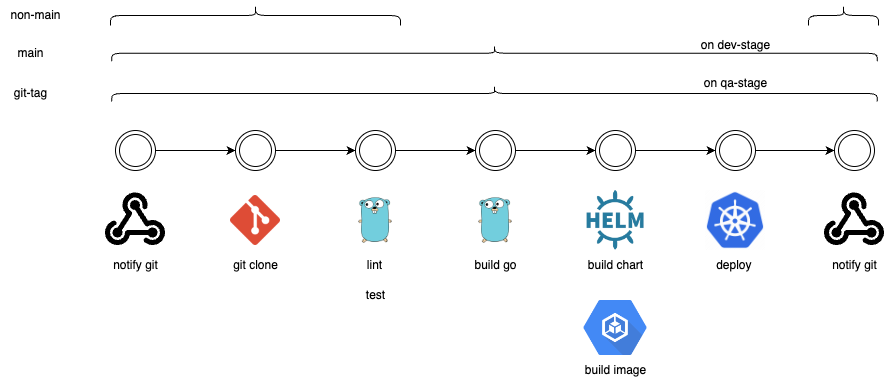
Let us have a look at a common pattern of a pipeline strategy you can face.
Feature branch
When committing changes to a feature branch, the pipeline initiates with the following stages:
1. Notify GitHub: This very first step will notify github via status-api the beginning of a build.
2. Lint and test: The code changes are linted and subjected to unit or integration tests.
3. Go build: If the linting and tests pass successfully, the code is built using the Go compiler.
4. Notify GitHub: This last step will notify github via status-api the status of the build.
Main branch
Commits to the main branch initiate the following stages:
1. Notify GitHub: This very first step will notify github via status-api the beginning of a build.
2. Lint and test: The code changes are lined and subjected to unit or integration tests.
3. Go build: If the linting and tests pass successfully, the code is built using the Go compiler.
4. Container image build: The built code is containerized into a container image tagged as the latest version and pushed to a container registry.
5. Helm chart package: The helmet chart is packaged and published as latest to a central location.
6. Deploy to dev stage: This step is used to deploy the latest version into the dev namespace on the current kubernetes cluster.
7. Notify GitHub: This last step will notify github via status-api the status of the build.
Git tag created
When a Git tag is created, indicating a release version, the following stages are executed:
1. Notify GitHub: This very first step will notify github via status-api the beginning of a build
2. Lint and test: The code changes are lined and subjected to unit or integration tests.
3. Go build: If the linting and tests pass successfully, the code is built using the Go compiler.
4. Container image build: The built code is containerized into a container image tagged as the latest version and pushed to a container registry.
5. Helm chart package: The helm chart versioned based on the created git-tag is packaged and published to a central location.
6. Deploy to qa stage: This step is used to deploy the git-tag version into the qa namespace on the current kubernetes cluster.
7. Notify GitHub: This last step will notify github via status-api the status of the build.
2 Pipeline implementation
Now that we have designed our CI/CD pipeline using Tekton, let’s dive into its implementation details. Our pipeline is structured to automate the build, test, and deployment processes for a Go-based application. Below, we’ll explore each component and configuration file involved in our pipeline setup.
Directory structure
.
|-- pipelines
| `-- 7.02-go-pipeline.yaml
|-- rbac
| |-- 7.02-rbac-deployer.yaml
| `-- 7.02-rbac-trigger.yaml
|-- secrets
| |-- 7.02-github-interceptor-secret.yaml
| |-- 7.02-github-repo-secret.yaml
| |-- 7.02-github-status-api-secret.yaml
| `-- 7.02-quay-secret.yaml
|-- tasks
| `-- 7.02-helm-build-push.yaml
`-- trigger
  |-- 7.02-eventlistener.yaml
  |-- 7.02-tb.yaml
  |-- 7.02-trigger.yaml
  `-- 7.02-tt.yaml
./pipelines: Contains the Tekton pipeline configuration file.
./rbac: Contains the rbac for the trigger and the deployer service-account
./secrets: Includes secrets such as for quay & github.
./tasks: Holds self-maintained task definitions used within the pipeline.
./trigger: Contains configuration files for triggering pipeline execution.
3 Pipeline definition
Our pipeline configuration is defined in the 7.02-go-pipeline.yaml file. This file outlines the workflow of our CI/CD pipeline.
7.02-go-pipeline.yaml
apiVersion: tekton.dev/v1beta1
child: Pipeline
metadata:
  name: 7-02-go-pipeline
  namespace: default
spec:
  workspaces:
  - name: shared-workspace
  - name: helm-workspace
  - name: dockerconfig-ws
  params:
  - name: git-url
  description: Git Repo to check out the desired Git repository
  type: string
  - name: git-revision
  description: Revision to be used from the code repository for building and testing
  type: string
  default: main
  - name: git-repo-full-name
  description: Used to leverage the Git Status API
  type: string
  - name: is-main-branch
  description: Flag to be used for conditional pipeline execution (CI/CD up to the dev namespace)
  type: string
  default: false
  - name: is-git-tag
  description: Flag to be used for conditional pipeline execution (CI/CD up to the QA namespace)
  type: string
  default: false
  - name: image-repository
  description: Image registry where images will be pushed
  type: string
  default: quay.io/christoph_linse
  - name: app-name
  description: App name to be used for container image and Helm chart builds
  type: string
  - name: image-tag
  description: Container image tag to be used
  type: string
  default: latest
  - name: chart-tag
  description: Default Helm chart tag to be used
  type: string
  default: 1.0.0
  - name: golang-version
  description: Version of Go to be used
  type: string
  default: "1.22"
  tasks:
  - name: notify-github
  taskRef:
  name: github-set-status
  params:
  - name: REPO_FULL_NAME
  value: "$(params.git-repo-full-name)"
  - name: SHA
  value: "$(params.git-revision)"
  - name: DESCRIPTION
  value: "Build has started"
  - name: STATE
  value: pending
  - name: TARGET_URL
  value: "http://localhost:9097/#/pipelineruns"
  - name: fetch-source
  taskRef:
  name: git-clone
  params:
  - name: url
  value: $(params.git-url)
  - name: deleteExisting
  value: "true"
  - name: revision
  value: $(params.git-revision)
  workspaces:
  - name: output
  workspace: shared-workspace
  - name: test-code
  taskRef:
  name: golang-test
  params:
  - name: package
  value: "$(params.app-name)"
  - name: version
  value: "$(params.golang-version)"
  workspaces:
  - name: source
  workspace: shared-workspace
  runAfter:
  - fetch-source
  - name: lint-code
  taskRef:
  name: golangci-lint
  params:
  - name: package
  value: "$(params.app-name)"
  - name: flags
  value: --verbose
  - name: version
  value: "v$(params.golang-version)"
  workspaces:
  - name: source
  workspace: shared-workspace
  runAfter:
  - fetch-source
  - name: build-image
  taskRef:
  name: buildah
  params:
  - name: IMAGE
  value: $(params.image-repository)/$(params.app-name):$(params.image-tag)
  workspaces:
  - name: source
  workspace: shared-workspace
  - name: dockerconfig
  workspace: dockerconfig-ws
  runAfter:
  - lint-code
  - test code
  When:
  - input: "true"
  operator: in
  values: [ "$(params.is-main-branch)", "$(params.is-git-tag)" ]
  - name: build-helm
  taskRef:
  name: 7-02-helm-build-push
  params:
  - name: HELM_CHART_NAME
  value: "$(params.app-name)"
  - name: HELM_CHART_TAG
  value: "$(params.chart-tag)"
  workspaces:
  - name: source
  workspace: shared-workspace
  - name: helm-repo
  workspace: helm-workspace
  runAfter:
  - build-image
  When:
  - input: "true"
  operator: in
  values: [ "$(params.is-main-branch)", "$(params.is-git-tag)" ]
  - name: deploy-dev
  taskRef:
  name: helm-upgrade-from-repo
  params:
  - name: helm_repo
  value: https://c-linse.github.io/tekton-course-charts
  - name: chart_name
  value: "tekton-course-charts/$(params.app-name)"
  - name: release_version
  value: "$(params.chart-tag)"
  - name: release_name
  value: "$(params.app-name)"
  - name: release_namespace
  value: dev
  runAfter:
  - build-helm
  When:
  - input: "true"
  operator: in
  values: [ "$(params.is-main-branch)" ]
  - name: deploy-qa
  taskRef:
  name: helm-upgrade-from-repo
  params:
  - name: helm_repo
  value: https://c-linse.github.io/tekton-course-charts
  - name: chart_name
  value: "tekton-course-charts/$(params.app-name)"
  - name: release_version
  value: "$(params.chart-tag)"
  - name: release_name
  value: "$(params.app-name)"
  - name: release_namespace
  value: qa
  runAfter:
  - build-helm
  When:
  - input: "true"
  operator: in
  values: [ "$(params.is-git-tag)" ]
  Finally:
  - name: notify-git-state-success
  taskRef:
  name: github-set-status
  When:
  - input: "$(tasks.status)"
  operator: notin
  values: [ "Failed" ]
  params:
  - name: REPO_FULL_NAME
  value: "$(params.git-repo-full-name)"
  - name: SHA
  value: "$(params.git-revision)"
  - name: DESCRIPTION
  value: "The build was successful"
  - name: STATE
  value: success
  - name: TARGET_URL
  value: "http://localhost:9097/#/pipelineruns"
Key features of go-pipeline:
- GitHub repository integration: The pipeline fetches source code from a git repository, enabling seamless integration with version control systems such as GitHub.
- Linting and testing: Utilizes linting to ensure code quality by identifying linting errors and potential issues in the codebase and performs testing like unit and integration tests.
- Container image building: Builds container images containing the Go application, facilitating containerization for deployment across various environments.
- Helm chart packaging: Packages the containerized applications manifests into a helm chart, simplifying the deployment process in kubernetes environments.
- Deployment dev/qa: Deploys into the same cluster into the dev or qa namespace depending on the git revision (main branch or git tag)
Customizable parameters:
- git-url: Git repo to checkout the desired code base
- git-revision: Revision to be used from repo of the code
- git-repo-full-name: Used to leverage git status api
- is-main-branch: Flag to be used for conditional pipeline executing (CI CD up to dev namespace)
- is-git-tag: Flag to be used for conditional pipeline executing (CI CD up to qa namespace)
- image-repository: Image registry where images are going to be pushed to
- app-name: App name to be used for container-image and helm-chart build
- image-tag: Container-image tag to be used
- chart-tag: Default helm-chart tag to be used
- golang-version: Version of golang to be used
Conditional execution:
- The pipeline includes conditional logic to differentiate between feature branch commits and main branch commits. Certain tasks, such as container image building and helm chart packaging, are executed only for commits to the main branch and on git tag creation, optimizing resource usage and ensuring efficient pipeline execution.
4 Task installation
To install Tekton tasks on the GKE cluster, let’s have a look at the provided script. These task are beeing used by the tekton pipeline we have just defined.
Task Installation
tkn hub install task git-clone --version 0.9 --namespace default
tkn hub install task golangci-lint --version 0.2 --namespace default
tkn hub install task golang-test --version 0.2 --namespace default
tkn hub install task buildah --version 0.7 --namespace default
tkn hub install task helm-upgrade-from-repo --version 0.2 --namespace default
tkn hub install task github-set-status --version 0.4 --namespace default
5 Custom helmet task
The helm-build-push task is a custom Tekton task designed to lint and package a Helm chart into a tar.gz file and push it to a
web server. This task streamlines the process of packaging and publishing helm charts, facilitating the deployment of
applications in Kubernetes environments.
Parameters
HELM_CHART_NAME: Defines the name of the helmet chart to be packaged and pushed.
HELM_CHART_TAG: Specifies the tag to be used for the helmet chart version.
HELM_TARGET_ARTIFACTORY: Specifies the server URL to which the helm chart will be pushed.
Steps
1. helm-lint: Lint the Helm chart to dectect potential linting issues
2. helm-package: Packages the helm chart into a tar.gz file using the specified chart name and version.
3. helm-publish: Clones the target artifact repository, copies the packaged chart, updates the repository index, commits the changes, and pushes them to the remote repository.
The task looks like the following:
7.02-helm-build-push.yaml
apiVersion: tekton.dev/v1
child: Task
metadata:
  name: 7-02-helm-build-push
spec:
  description: This task runs Helm Lint, packages a Helm chart into a tar.gz file, and pushes it to a web server
  params:
  - name: HELM_CHART_NAME
  description: Chart name to use for packaging and deployment
  type: string
  - name: HELM_CHART_TAG
  description: Tag to be used for Helm build and push
  type: string
  - name: HELM_TARGET_ARTIFACTORY
  description: Server to be used for publishing Helm packages
  type: string
  default: https://github.com/c-linse/tekton-course-charts.git
  workspaces:
  - name: source
  - name: helm-repo
  steps:
  - name: helm-lint
  image: dtzar/helm-kubectl:3.14.1
  workingDir: $(workspaces.source.path)
  script: |

#!/bin/bash
  set -e
  cd helm
  Helm Lint .

  - name: helm-package
  image: dtzar/helm-kubectl:3.14.1
  workingDir: $(workspaces.source.path)
  script: |

#!/bin/bash
  set -e
  cd helm
  helm package . \
  --version "$(params.HELM_CHART_TAG)" \
  --app-version "$(params.HELM_CHART_TAG)" \
  -d "$(workspaces.source.path)/$(params.HELM_CHART_NAME)"

  - name: helm-publish
  image: dtzar/helm-kubectl:3.14.1
  workingDir: $(workspaces.helm-repo.path)
  script: |

#!/bin/bash
  set -e
  git clone $(params.HELM_TARGET_ARTIFACTORY) .
  git config user.name "c-linse"
  git config user.email "christophlinse@googlemail.com"
  mkdir -p "$(params.HELM_CHART_NAME)"
  cp -R \
  "$(workspaces.source.path)/$(params.HELM_CHART_NAME)/$(params.HELM_CHART_NAME)-$(params.HELM_CHART_TAG).tgz" \
  "$(params.HELM_CHART_NAME)/"
  helm repo index .
  git add index.yaml "$(params.HELM_CHART_NAME)"
  git commit -m "$(params.HELM_CHART_NAME)-$(params.HELM_CHART_TAG)"
  git push origin main
6 Secrets
In our pipeline setup, we utilize a couple of secrets to securely manage sensitive information required for various operations. These secrets can be created and maintained in GitHub on project and organization level and of course on quay.io for the container registry secret. These secrets have to be configured and applied to kubernetes secrets as mention in the following:
GitHub repo secret
This secret contains the authentication credentials required to access the GitHub repository hosting the application code. This secret will be used by the git clone task from the TektonHub.
7.02-github-repo-secret.yaml
apiVersion: v1
child: Secret
metadata:
  name: 7-02-git-repo-secret
  annotations:
  tekton.dev/git-0: https://github.com
type: kubernetes.io/basic-auth
stringData:
  username: "c-linse"
  password: ""
GitHub status api secret
This secret holds a GitHub token used for authentication when interacting with GitHub status api. It will be used to update the state of the git-revision the pipeline executes.
7.02-github-status-api-secret.yaml
apiVersion: v1
child: Secret
metadata:
  name: github
  namespace: default
type: Opaque
data:
  token: ""
GitHub interceptor secret
This secret holds a GitHub token used for authentication when interacting with GitHub repositories. It will be used by the tekton trigger interceptor to ensure that only valid webhooks will instantiate the pipeline.
7.02-github-interceptor-secret.yaml
apiVersion: v1
child: Secret
metadata:
  name: 7-02-github-interceptor-secret
type: Opaque
stringData:
  token: ""
Quay registry secret
This secret stores the authentication credentials necessary for pushing container images to the https://quay.io container registry. It ensures secure access to the registry, facilitating image publishing and distribution. This secret will be used by the buildah task from the tekton hub.
7.02-quay-secret.yaml
apiVersion: v1
child: Secret
metadata:
  name: 7-02-quay-secret
stringData:
  config.json: |
  {
  "auths": {
  "quay.io/christoph_linse": {
  "auth": ""
  }
  }
  }
7 Trigger definition
Eventlistener
The eventlistener resource 7-02-github-el will be additionally exposed by a loadbalancer. That instructs GCP to
expose the eventlistener pod with a public ip address which we are able to reach and more important GitHub can leverage for sending webhooks.
7.02-eventlistener.yaml
apiVersion: triggers.tekton.dev/v1beta1
child: EventListener
metadata:
  name: 7-02-github-el
spec:
  triggers:
  - triggerRef: 7-02-github-trigger
  serviceAccountName: 7-02-tekton-triggers-sa
---
apiVersion: v1
child: Service
metadata:
  name: lb-tekton-event-listener-service
spec:
  selector:
  eventlistener: 7-02-github-el
  ports:
  - protocol: TCP
  port: 80
  targetPort: 8080
  type: LoadBalancer
TriggerBinding
The TriggerBinding resource named 7-02-github-tb defines parameters that extract information from GitHub webhook
payloads. It captures details like the repository url, revision, image tag, whether it’s a git-tag and more.
7.02-tb.yaml
apiVersion: triggers.tekton.dev/v1beta1
child: TriggerBinding
metadata:
  name: 7-02-github-tb
  namespace: default
spec:
  params:
  - name: git-repository-url
  value: $(body.repository.clone_url)
  - name: git-repo-full-name
  value: $(body.repository.full_name)
  - name: git-revision
  value: $(body.head_commit.id)
  - name: app-name
  value: $(body.repository.name)
  - name: image-tag
  value: $(extensions.image-tag)
  - name: chart-tag
  value: $(extensions.chart-tag)
  - name: is-main-branch
  value: $(extensions.is-main-branch)
  - name: is-git-tag
  value: $(extensions.is-git-tag)
TriggerTemplate
The TriggerTemplate resource named 7-02-github-tt defines parameters and resource templates for pipeline runs. It
extracts parameters from the TriggerBinding and configures workspace volumes for pipeline execution, ensuring access
to required resources like Git repositories and Docker configuration secrets.
7.02-tt.yaml
apiVersion: triggers.tekton.dev/v1beta1
child: TriggerTemplate
metadata:
  name: 7-02-github-tt
  namespace: default
spec:
  params:
  - name: git-repository-url
  - name: git-revision
  - name: git-repo-full-name
  - name: image-tag
  - name: chart-tag
  - name: app-name
  - name: is-main-branch
  - name: is-git-tag
  resourcetemplates:
  - apiVersion: tekton.dev/v1beta1
  child: PipelineRun
  metadata:
  generateName: go-pipeline-run-
  namespace: default
  spec:
  pipelineRef:
  name: 7-02-go-pipeline
  podTemplate:
  securityContext:
  fsGroup: 65532 # To make the volumes accessible to non-root users, we need to either configure the permissions manually or set the fsGroup
  taskRunSpecs:
  - pipelineTaskName: deploy-dev
  taskServiceAccountName: 7-02-deployer-sa
  - pipelineTaskName: deploy-qa
  taskServiceAccountName: 7-02-deployer-sa
  params:
  - name: git-url
  value: $(tt.params.git-repository-url)
  - name: git-revision
  value: $(tt.params.git-revision)
  - name: git-repo-full-name
  value: $(tt.params.git-repo-full-name)
  - name: app-name
  value: $(tt.params.app-name)
  - name: image-tag
  value: $(tt.params.image-tag)
  - name: chart-tag
  value: $(tt.params.chart-tag)
  - name: is-main-branch
  value: $(tt.params.is-main-branch)
  - name: is-git-tag
  value: $(tt.params.is-git-tag)
  workspaces:
  - name: shared-workspace
  volumeClaimTemplate:
  spec:
  accessModes:
  - The ReadWriteOnce # access mode may affect how you can use this volume in parallel tasks
  resources:
  requests:
  storage: 10Mi
  - name: dockerconfig-ws
  secret:
  secretName: 7-02-quay-secret
  - name: helm-workspace
  emptyDir:
  medium: Memory
Trigger
The Trigger resource 7-02-github-trigger binds to the 7-02-github-tb TriggerBinding and references the
7-02-github-tt TriggerTemplate. It intercepts GitHub webhook events using interceptors, modifies parameters using CEL
expressions, and triggers pipeline-runs based on the defined conditions.
To have a detail look the following yaml must be seen:
7.02-trigger.yaml
apiVersion: triggers.tekton.dev/v1beta1
child: Trigger
metadata:
  name: 07-github-trigger
  namespace: default
spec:
  bindings:
  - ref: 07-github-tb
  template:
  ref: 07-github-tt
  interceptors:
  - ref:
  name: "github"
  child: ClusterInterceptor
  apiVersion: triggers.tekton.dev
  params:
  - name: "secretRef"
  value:
  secretName: 07-github-interceptor-secret
  secretKey: token
  - ref:
  name: "cel"
  params:
  - name: overlays
  value:
  - key: is-main-branch
  expression: body.ref.matches('refs/heads/main')
  - key: is-git-tag
  expression: body.ref.matches('refs/tags/.*')
  - key: image-tag
  expression: body.ref.split('/')[2].replace('main', 'latest')
  - key: chart-tag
  expression: body.ref.split('/')[2].replace('main','1.0.0')
8 RBAC
Rbac is beeing used to enable the service-account 7-02-tekton-triggers-sa to create tekton resources and the service-account 7-02-deployer-sa to be able to deploy to certain stages.
Setup Namespaces
Setup dev & qa namespace
$ kubectl create namespace dev
$ kubectl create namespace qa
RBAC trigger
7.02-rbac-trigger.yaml
apiVersion: v1
child: ServiceAccount
metadata:
  name: 7-02-tekton-triggers-sa
  namespace: default
---
apiVersion: rbac.authorization.k8s.io/v1
child: RoleBinding
metadata:
  name: 7-02-triggers-event-listener-binding
  namespace: default
subjects:
  - child: ServiceAccount
  name: 7-02-tekton-triggers-sa
  namespace: default
roleRef:
  apiGroup: rbac.authorization.k8s.io
  child: ClusterRole
  name: tekton-triggers-eventlistener-roles
---
apiVersion: rbac.authorization.k8s.io/v1
child: ClusterRoleBinding
metadata:
  name: 7-02-triggers-event-listener-cluster-binding
subjects:
  - child: ServiceAccount
  name: 7-02-tekton-triggers-sa
  namespace: default
roleRef:
  apiGroup: rbac.authorization.k8s.io
  child: ClusterRole
  name: tekton-triggers-eventlistener-clusterroles
RBAC Deployer
7.02-rbac-deployer.yaml
apiVersion: v1
child: ServiceAccount
metadata:
  name: 7-02-deployer-sa
  namespace: default
---
child: Role
apiVersion: rbac.authorization.k8s.io/v1
metadata:
  namespace: dev
  name: 7-02-deployer-role-dev
rules:
  - apiGroups: [""]
  resources: ["secrets", "configmaps", "deployments", "serviceaccounts", "services"]
  verbs: ["get", "list", "create", "update", "delete", "patch"]
  - apiGroups: ["apps"]
  resources: ["deployments", "replica sets"]
  verbs: ["get", "list", "create", "update", "delete", "patch"]
---
child: Role
apiVersion: rbac.authorization.k8s.io/v1
metadata:
  namespace: qa
  name: 7-02-deployer-role-qa
rules:
  - apiGroups: [""]
  resources: ["secrets", "configmaps", "deployments", "serviceaccounts", "services"]
  verbs: ["get", "list", "create", "update", "delete", "patch"]
  - apiGroups: ["apps"]
  resources: ["deployments", "replica sets"]
  verbs: ["get", "list", "create", "update", "delete", "patch"]
---
child: RoleBinding
apiVersion: rbac.authorization.k8s.io/v1
metadata:
  name: 7-02-deployer-dev-rolebinding
  namespace: dev
subjects:
  - child: ServiceAccount
  name: 7-02-deployer-sa
  namespace: default
roleRef:
  child: Role
  name: 7-02-deployer-role-dev
  apiGroup: rbac.authorization.k8s.io
---
child: RoleBinding
apiVersion: rbac.authorization.k8s.io/v1
metadata:
  name: 7-02-deployer-qa-rolebinding
  namespace: qa
subjects:
  - child: ServiceAccount
  name: 7-02-deployer-sa
  namespace: default
roleRef:
  child: Role
  name: 7-02-deployer-role-qa
  apiGroup: rbac.authorization.k8s.io
9 References & links
Checkout Github for code and the Tekton Udemy course to understand and get even more content!

