This site is also available in:
The requirement “completely without cloud connectivity” effectively excludes Microsoft Teams because Microsoft Teams is designed as a SaaS/cloud service and does not provide an on-premises version. This shifts the problem from “which tool is similar?” to “which system can be operated technically, organizationally and regulatory in such a way that no third-party cloud services (incl. push gateways, telemetry/registration, marketplace access, update dependencies) are necessary in productive operation”.
For a bank setting (strict traceability, identity integration, audit/retention, HA/DR, controlled changes), two realistic top candidates emerge if “no cloud” is interpreted strictly:
Many self-hosted solutions deliver push via provider gateways or via Apple/Google push services (APNs/FCM), both of which are strictly speaking “third-party providers”. This must either be (a) consciously deactivated/accepted, (b) solved by an explicitly air-gapped product or (c) compensated for via alternative mobile strategies (e.g. MDM policies, “always-on” clients, possibly Android without Google services) (not specified).
Context and requirements
Initial situation and hard boundary condition
A bank needs a replacement for Microsoft Teams that can be operated completely without cloud connectivity: on-premises or completely self-hosted, without dependence on third-party cloud services. (Interpretation: no part of operations – not even push, license sync, marketplace, telemetry, TURN-as-a-Service – must necessarily go to the Internet/vendor cloud. This interpretation is to be understood as an assumption because the “no cloud policy” is not specified in detail).
The fact that Microsoft Teams itself does not offer an on-premises server version is the key driver for an alternative platform.
Functional scope that is typically “team-critical” in the banking context
The attributes you mentioned can be translated into must/should clusters typical for banks:
- Identity & access: AD/LDAP integration, SSO (SAML/OIDC), roles/privileges, SCIM provisioning if necessary.
- Communication: 1:1/group chat, persistent “channels/streams” incl. threads, search, file attachments; audio/video meetings, screen sharing.
- Compliance: Audit logs, retention/legal hold/eDiscovery/export capability. (Teams uses Microsoft Purview for this; in an on-prem setting, equivalents or SIEM/archive integration are required).
- Operation & resilience: HA (node redundancy), backup/restore, disaster recovery plan, monitoring, patch/update process also offline.
- End devices: Windows/macOS/Linux, iOS/Android, web client + browser support.
Not specified (will be explicitly marked as open in the blog)
Several decisive parameters are not defined in the request and strongly influence the architecture, costs and product selection: number of users, simultaneous meeting load, external federation/partner access (Internet/DMZ yes/no), retention periods, eDiscovery process (internal/external), MDM stack, network segmentation and degree of integration in Exchange/Outlook (pure invitation template vs. real presence/calendar integration).
Candidate analysis
The solutions you have prioritized are evaluated below – with a focus on “fully offline/on-prem” as a hard guard rail.
Skype for Business Server (Subscription Edition) as “Microsoft On-Prem” path
Brief description: On-premises UC platform with IM/presence, conferencing and optional persistent chat (permanent chat rooms).
Deployment: Classic on-prem (pools/edge). Federation/external access is typically provided via edge servers (DMZ-capable, policy-controlled).
Team coverage:
- Strengths: Presence, classic enterprise voice/conferencing tradition, SIP federation.
- Gaps compared to Teams: “Modern Work Hub” (apps/workflows), file collaboration such as SharePoint/OneDrive ecosystem, UX expectations.
Compliance/Archiving: Persistent Chat Server stores content permanently (text/links/files in the chat context), which can support compliance requirements, but is functionally different from Teams channels.
License/support reality: Subscription Edition requires active Software Assurance or suitable subscription licenses; Microsoft thus positions the on-prem server products as “version-less” with Modern Lifecycle Updates.
Suitability for a bank Very good if the focus is on maximum Microsoft on-prem continuity (AD/Exchange proximity, classic UC). Weaker if a “Teams-like” channel/app model and modern collaboration are expected.
Mattermost (self-hosted)
Brief description: Team messaging with channels, strong admin/compliance focus and integrated calls (plugin).
Deployment: Self-hosted; enterprise features for compliance and HA clustering.
Audio/Video: Calls plug-in; default participant limit is configurable, practical recommendation up to ~50 per call depending on resources (important operational note for bank meetings/all-hands).
Compliance/eDiscovery: Explicitly documented for compliance monitoring, retention and eDiscovery export; connection to archive/eDiscovery third-party systems (e.g. Smarsh, Global Relay, Proofpoint) is mentioned.
HA/DR: HA cluster deployment available (Enterprise); however, no HA topology supported across multiple data centers (important for true active-active DR).
Clients: Desktop app for Windows/macOS/Linux; web experience available.
Security/Certifications: Official Trust area lists SOC 2 Type II (2025) and ISO 27001 (2022) as available artifacts (vendor-side).
Costs (ball park, estimate):
- License: Enterprise subscription (prices usually subject to quotation; varies according to user tier/support).
- Infrastructure: typically 3+ app nodes + DB cluster + object/file store; depending on the number of users and call load from “few VMs” (pilot) to “dedicated cluster resources” (rollout).
(Bandwidth deliberately as an estimate, as public prices are not standardized and strongly dependent on load/SLA).
Suitability for a bank: Very strong for internal operations with audit/retention/discovery and clear operating processes; meetings >50 participants should be tested early in a performance proof or supplemented via external/additional meeting components (e.g. on-prem video).
Rocket.chat (self-hosted, incl. “air-gapped” mode)
Brief description: Collaboration platform with messaging, voice/video, compliance controls, Kubernetes scaling and E2EE options.
Deployment: Self-managed (Docker/Kubernetes) and explicitly documented “air-gapped workspace”; microservices architecture is recommended for greater concurrency.
Compliance:
- Audit Logs/Message Auditing Panel documented (Enterprise functions).
- Retention policies available (messages are otherwise “never” deleted).
E2EE: Workspace-wide activation possible; encrypted rooms possible.
Bank trade-off: E2EE can make auditing/discovery more difficult if auditors have to track content on the server side (this conflict of objectives is conceptual).
Push notifications as a no-cloud risk: Default gateway is gateway.rocket.chat; documentation also indicates cloud terms/registration, and direct communication to Apple/Google (APNs/FCM) takes place when the gateway is deactivated. This collides with “no third-party provider” or “no Internet”.
Update/support window: Rocket.Chat documents that versions are only supported for a limited period of time (EOL window); this increases operational patch pressure, which often increases change window/validation effort in banks.
Security/Certifications: ISO 27001 is reported in the compliance area (scope according to documentation); Rocket.Chat also communicates SOC 2 Type II as a current achievement (Feb 2026).
Suitability for bank: Strong for messaging + compliance control; if strictly offline, push/registration/marketplace dependencies must be designed particularly carefully (e.g. mobile strategy without push or with strictly controlled exception).
Element Server Suite (Matrix/Synapse) – sovereign and air-gapped
Brief description: Matrix-based enterprise suite (server + clients + conferencing via Element Call), explicitly for digital sovereignty and isolated networks. Matrix is shaped by The Matrix.org Foundation as an open standard; Synapse is maintained by Element in accordance with the project notes (note the license/maintenance reality).
Air-gapped/offline capability: Element explicitly positions the Sovereign/air-gapped offer as “no internet required” – including installation, updates and notifications; a “custom mobile push gateway” option is also mentioned.
Identity/SSO: Delegated Authentication supports LDAP/SAML/OIDC (described in ESS documentation).
Conferencing: Element Call is described as a conference component with a claim to scale (multi-SFU architecture, “sovereignty” argumentation).
Compliance controls: Pricing/feature overview names Retention Policies, Auditing/Reporting and Data Export as enterprise functions.
Backup/DR: Element documents backup & restore and names critical components for DR (PostgreSQL DB, keys, Auth-DB etc.).
Security/Certifications: Element communicates ISO/IEC 27001:2022 certification (blog/price page).
Costs (ball park, estimate):
- ESS Pro is priced “per seat/month”, Sovereign “per deployment” (offer model).
- Infrastructure: typically Kubernetes-based (or standalone), Postgres + persistent volumes; additional components for federation control/border gateway depending on security domains.
Suitability for bank: Very high if “no cloud” and isolated networks are really leading and modern messenger/channel functionality + conferences are required at the same time. Particularly relevant if external federation/partner communication is desired in the future (matrix federation model, controllable).
Nextcloud Talk / Nextcloud Hub (Files + Talk + Groupware)
Brief description: Collaboration platform with a strong focus on files/sharing; Talk offers chat + audio/video incl. screen sharing.
Deployment: on-prem/private cloud. Talk is explicitly positioned as on-prem/private collaboration.
Files & on-prem file server integration: External Storage supports SMB/CIFS file servers, among others; admin documentation describes SMB integration.
Meetings & scaling: Talk High Performance Backend (HPB) includes signaling + WebRTC gateway; Talk scalability documentation describes with HPB typically 30-50 active participants and hundreds of passive (bandwidth limited).
E2EE: Nextcloud documents E2EE primarily for files (client-side).
There is a “call-end-to-end-encryption” capability for Talk (off by default until all mobile clients support it).
According to community statements, E2EE is currently not available for Talk text messages (secondary source, to be understood as a risk/limit).
Audit/logging: Admin manual mentions logging and optionally the admin_audit app for extended event logging.
Vendor support, SLA & price reference (transparent): Nextcloud publishes specific €/user/year prices, response times and optional Talk subscriptions (e.g. Talk from €42/user/year, Files tiers from ~€71/user/year; support response times per tier).
No-cloud risk: push notifications: Nextcloud describes push notifications via a “Nextcloud Push Proxy” (free hosted service from Nextcloud). This is a potential show-stopper for strictly “no-cloud” users if mobile push is absolutely necessary.
(Note: There is a portal article “On premise push proxy server”, the detailed content of which is not publicly accessible; feasibility/product maturity for a bank can therefore not be verified in this blog).
Suitability for a bank: Very good if the focus is on file collaboration with on-prem storage integration and Talk is “good enough” as a communication layer – with the central open question of how mobile push should be solved “cloud-free”.
Jitsi (on-prem video conferencing)
Brief description: Open source WebRTC video conferencing, self-hostable (Debian/Ubuntu Quickstart).
Deployment: Own Jitsi Meet stack; suitable as a “meeting engine” in addition to chat platforms.
Security/E2EE: Jitsi describes optional end-to-end encryption in browsers with insertable streams (Chromium-based browsers; also Electron client).
Clients/Browsers: Documented browser support, incl. iOS special features.
Suitability for a bank: Strong as a pure conference module on-prem; unsuitable as a complete Teams replacement (not a fully-fledged channel/compliance system).
Cisco Meeting Server + Cisco IM & Presence (On-Prem UC stack)
Brief description: Premises-based meetings (Cisco Meeting Server) plus IM/Presence (Cisco Unified Communications Manager IM & Presence).
Browser/WebRTC: Cisco Meeting Server Web App allows Join via WebRTC browser.
Suitability for a bank: Very good for classic UC/meetings on-prem; as a Teams replacement for Channels/Files usually only useful in combination with an additional Chat/Files platform.
Zulip (self-hosted chat/streams)
Brief description: Stream-based team chat (strong for asynchronous communication, threads), fully self-hostable.
SSO: SAML-SSO is also documented for self-hosted.
Scaling/requirements: Documentation specifies requirements and scaling instructions (e.g. 100+ users: 4 GB RAM/2 CPUs as a guideline).
Limit: No native enterprise meeting suite like Teams; typically integration with Jitsi/others for video.
Suitability for a bank: Good for chat/knowledge threads; as a full replacement only with an additional meeting stack.
Openfire/Prosody XMPP (with plugins)
Brief description: XMPP server (Openfire/Prosody) as a basis for IM; can be extended via plugins/clients.
Directory integration: Openfire documents AD/LDAP integration.
Limit: Modern Team-UX (channels, files, eDiscovery, meeting scale) depends heavily on client ecosystem/plugins; integration/operational risk high.
Suitability for a bank: Rather niche/protection of existing business; only realistic as a team replacement with bank UX/compliance requirements with considerable engineering performance.
Wire (on-prem/air-gapped secure messenger)
Brief description: Secure messenger/collaboration with E2EE for messages/calls/files; deployments incl. air-gapped possible (Wire for Governments).
E2EE property: Wire says that messages/calls are always E2EE and cannot be deactivated; key material remains on end devices.
SSO/provisioning: Wire documents SSO (SAML) and SCIM provisioning.
Compliance trade-off: “Always E2EE” can collide with eDiscovery/archiving in the banking environment if the bank has to export content records in a legally compliant manner (not excluded, but organizationally/technically demanding due to key ownership model).
Clients: Wire offers downloads/clients (iOS etc.).
Suitability for a bank: Very good for “high-security messaging”/crisis communication in isolated networks; potentially limited as a completely equivalent Teams replacement depending on compliance/records obligations.
Comparison and evaluation
Feature matrix “vs Teams” (focused on No-Cloud-On-Prem)
Legend: ✅ = good/integrated, ⚠️ = possible but with restrictions/additional components, ❌ = not primarily intended.
| Candidate | Fully offline without third-party cloud (operation) | Chat + persistent channels | Audio/video (suitable for meetings) | Screen sharing | File sharing + on-prem file server integration | AD/LDAP + SSO | Audit/Retention/Discovery | Clients (desktop/mobile/web) |
|---|---|---|---|---|---|---|---|---|
| Skype for Business Server SE | ✅ (on-prem) | ⚠️ (Persistent Chat as a separate role model) | ✅ | ✅ (Conferencing) | ⚠️ (not “Files-Hub” like Teams) | ✅ (MS ecosystem) | ⚠️ (different from Teams-Purview) | ⚠️ (Teams-other client model) |
| Mattermost (Enterprise) | ✅ (self-host) | ✅ | ⚠️ (Calls, realistic recommendation ~50) | ✅ | ⚠️ (attachment store; integration possible, but not SMB mount paradigm) | ✅ (Enterprise-Auth) | ✅ (Compliance Export/Discovery) | (desktop/web; mobile via apps) |
| Rocket.chat | ⚠️ (air-gapped possible, but push/cloud services critical) | ✅ | ✅/⚠️ (depending on setup) | ✅ | ⚠️ (files/storage depending on backend) | ✅ (Directory/SSO usual) | ✅ (Audit logs/retention) | (Win/Mac/Linux/iOS/Android/Web) |
| Element Server Suite (Sovereign) | ✅ (explicitly offline incl. updates/notifications) | ✅ | ✅ (Element Call, E2EE) | ✅ (Conferences) | ⚠️ (Media Repo; file server integration rather via links/integrations) | (LDAP/OIDC/SAML depending on the mode) | ✅ (Auditing/Retention/Data Export) | (Win/macOS/Linux/iOS/Android/Web) |
| Nextcloud Hub (Talk/Files) | ⚠️ (on-prem yes; mobile push by default via Nextcloud Proxy) | ⚠️ (Conversations instead of Teams channels) | ✅/⚠️ (HPB recommended for Scale) | ✅ | (SMB/CIFS External Storage) | (Enterprise capabilities incl. SAML according to pricing) | ⚠️ (logging + admin_audit; eDiscovery to be built externally) | ✅ (Desktop/Mobile/Web) |
| Jitsi (on-prem) | ✅ | ❌ | ✅ (Video stack) | ✅ | ❌/⚠️ (no file hub function) | ⚠️ (Auth via Config/SSO possible, not core here) | ⚠️ (meeting logs depending on the setup) | ✅ (browser + apps) |
| Cisco Meeting Server + IM&P | ✅ (premises-based) | ⚠️ (IM&P rather classic, channels different) | ✅ | ✅ | ⚠️ | ⚠️ | ⚠️ | ✅/⚠️ (WebRTC Web App + Clients) |
| Zulip | ✅ | ✅ (Streams/Topics) | ❌/⚠️ (integration with meeting tool required) | ⚠️ | ⚠️ | ✅ (SAML self-hosted) | ⚠️ (export/logs depending on setup) | ✅ (Web + apps common; operation docs) |
| Wire | ✅ (called air-gapped deployments) | ⚠️ (Rooms/Teams, but Teams app hub is different) | ✅ (Calls/Meetings) | ✅ (typical) | ⚠️ | ✅ (SSO/SCIM) | ⚠️/❌ (E2EE always-on makes classic eDiscovery more difficult) | ✅ (iOS/Android/Desktop/Web) |
Valuation logic for a bank (qualitative)
If a bank (like many banks) needs verifiable records/exports, a system with server-side controllable compliance exports is an advantage (Mattermost heavily documented; Rocket.Chat with audit/retention; Element with retention/auditing).
If, on the other hand, a bank primarily prioritizes maximum confidentiality through to isolated networks, the value of an explicitly air-gapped product (Element, Wire) increases.
The biggest technical “no-cloud” stumbling block remains mobile push: Nextcloud calls a hosted push proxy, Rocket.Chat calls a gateway and/or APNs/FCM, Matrix/Element uses push gateway mechanisms (Sygnal → APNs/FCM), whereby a strict offline interpretation either (a) disables push or (b) requires a product that explicitly covers notifications without internet.
Recommendation and implementation roadmap
Final recommendation
Recommendation 1: Element Server Suite (sovereign/air-gapped) as a “hard no-cloud” primary solution
Reason: Element explicitly addresses offline operation “end-to-end” (installation/updates/notifications without the Internet), offers enterprise controls (retention, auditing, admin tooling), identity integration (LDAP/OIDC/SAML depending on the mode) and a conferencing component (Element Call).
Typical bank use cases: internal communication in isolated segments, secure exchange via defined rooms/hierarchies, controlled federation optional (if later desired and approved), crisis communication in isolated company networks.
Recommendation 2: Mattermost (Enterprise self-hosted) as a “compliance-strong Teams replacement” for core operations
Reason: Mattermost provides particularly clear compliance functionality (compliance monitoring, compliance export, eDiscovery export formats and integration notes), HA clusters in the data center and a pragmatic calls function including screen sharing (test under load assumptions).
Typical bank use cases: daily collaboration, team channels, incident/ops communication, auditability, defined retention/export pipelines in archive/SIEM/eDiscovery tooling.
Why not Nextcloud Talk as top 2?
Nextcloud is very attractive as a files/collaboration suite with transparent enterprise pricing and strong SMB integration, but the documented push proxy architecture (hosted) is in need of significant clarification under strict no-cloud interpretation – especially if iOS/Android push is “must-have”.
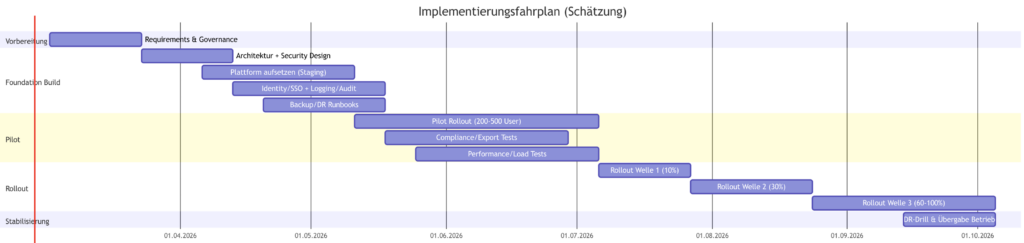
Implementation roadmap (phases, rough timeline, pilot design)
“Preparation” phase (approx. 2-4 weeks)
Goal: Finalize requirements and precisely operationalize “no cloud” (incl. mobile push policy), data classification per use case, retention/discovery target picture, success metrics, target architecture (Prod/DR) and operating model (DevSecOps vs. classic bank operation).
Foundation Build phase (approx. 4-8 weeks)
Objective: Set up the platform in a production-related staging zone incl. identity integration (LDAP/SSO), logging/audit pipeline, backup concept, monitoring, patch process. For Element: Backup/DR according to ESS guidelines (DB/Keys/Auth). For Mattermost: Set up HA cluster and define upgrade runbooks (rolling upgrades).
“Pilot” phase (approx. 6-10 weeks)
Target: Pilot with approx. 200-500 users (IT, operations, compliance stakeholders, 1-2 business units).
Focus:
- Functional coverage (chat/channels, meetings + screen sharing, files)
- Performance under load (calls/meetings; test the participant load early for Mattermost calls)
- Compliance processes: Export test runs (Mattermost Compliance Export/eDiscovery) / Audit workflows (Element Auditing/Retention)
- Security tests: hardening, threat model, pen test scope.
“Migration & rollout” phase (approx. 8-16 weeks, in waves)
Target: staggered rollout (e.g. 5-10% → 30% → 60% → 100%), training, champions network, runbooks/ITSM integration, deactivation/restriction of team use cases.
Stabilization & Optimization” phase (ongoing)
DR drills, incident playbooks, capacity planning, upgrades controlled in the bank change window.
Success criteria (measurable)
- Security/compliance: Audit trail complete (admin actions, export jobs), retention policies effective; eDiscovery exports reproducible and compliant (spot checks).
- Availability: HA failover without data loss; restore test after runbook successful (element: DB/Keys/Auth recovery; Mattermost: cluster failover in the data center).
- Performance: Defined meeting KPIs (join time, audio drop rate, screen share stability) met in pilot load profiles; participant limits explicitly validated for Mattermost calls according to resources.
- User adoption: defined activity metrics per unit (DAU/WAU), support ticket rate decreases after wave 2; “Shadow IT” decline.
Migration of teams: pragmatic strategy instead of 1:1 import
A genuine 1:1 migration of historical Teams chats/channels to a new platform is rarely loss-free in practice. Realistic approach:
- Export Teams data in a legally compliant manner and make it available as an archive (compliance/eDiscovery export): Microsoft Purview eDiscovery allows the collection/export of Teams content.
- Automated exports via Teams Export APIs (for defined scope/periods) – especially for records management and transition periods.
- Cutover with coexistence: new projects/channels in new system; old Teams artifacts read-only (policy).
- Files: Migrate separately (because Teams files are located in different backends). Microsoft describes Teams as a hub in Microsoft 365; files are an integral part of the ecosystem and must therefore be systematically handled separately.
Assumptions and open points
Assumptions in the blog
- “No-Cloud” was interpreted strictly: no vendor gateway, no mandatory registration/telemetry, no dependency on APNs/FCM or Nextcloud Push Proxy in productive target operation (unless explicitly approved as an exception).
- The bank operates at least one own data center/on-prem infrastructure with capability for HA clusters and regulated change processes (general bank assumption; not verified as fact).
Unspecified requirements (decision-relevant)
- Number of users (total) and peak concurrency (meetings/calls, large townhalls).
- Whether external federation/partner access is permitted (DMZ/Internet) or must remain completely internal.
- Specific retention periods (e.g. years) and whether “full-text eDiscovery” is required on the server side.
- Whether PSTN/SIP dial-in/dial-out is required (Teams telephony replacement) – only indirectly mentioned.
- MDM specifications (e.g. app config, certificates, device authorizations) and whether mobile devices may have Internet access.
- Required security certifications at vendor level vs. bank’s own certification of operations (SOC2/ISO artifacts from vendors are only a building block for self-hosted and do not replace bank controls; therefore only listed as due diligence input in the blog).

