This site is also available in:
Passwords and tokens are widely used, but also pose a common risk. If credentials are exposed and never changed, they can be misused over a long period of time. For this reason, many organizations require regular password rotation and separation of developers and intruders to hide sensitive information and reduce redundancy to minimize the risk of disclosure.
The challenge is not just to change the password itself. The real challenge is to do this without affecting running applications. This is discussed in this blog.
1 Two dimensions of password rotation
Basically, changing passwords regularly involves two different dimensions:
1) How the new password is transmitted to the target system
2) How the application uses this password
These two dimensions are often mixed together, but considering them separately makes it easier to make design decisions.
First dimension: transportation
This is about transferring the updated credentials to your runtime environment. An example of this is providing a database password for a Spring Boot application running in Kubernetes.
Second dimension: Use
This is about how your application reads and uses the login data. Common procedures include
- Environment variables
- Mounted files (e.g., from volumes)
- API calls to external system at runtime
Both dimensions must go hand in hand. A powerful provisioning mechanism is useless if the application cannot properly update or reload the credentials.
2 Common password providers
It should be mentioned at this point that there are several widely used tools for managing and rotating secrets:
- HashiCorp Vault
A flexible and popular solution that supports dynamic secrets and fine-grained access control. - CyberArk (including CyberArk Conjur)
Often used in enterprise environments with strict governance and audit requirements. - Cloud provider solutions
- Amazon Web Services (e.g., AWS Secrets Manager)
- Microsoft Azure (e.g., Azure Key Vault)
- Google Cloud (e.g., Google Secret Manager)
These providers take care of secure storage and password management themselves. The challenge of password rotation and provisioning is not inherently solved so that passwords can be seamlessly used and updated in the application context of your workload running in the cloud or on-premises on Kubernetes.
3 Mechanisms for password transmission (1st dimension)
To fulfill the requirement of temporarily providing the password managed by one of the tools mentioned in the section above, let’s take a closer look.
Bitnamis Sealed Secrets
With SealedSecrets, you encrypt a normal Kubernetes secret using a public key, creating a “SealedSecret” resource that can be committed to Git without exposing sensitive data. Within the cluster, the SealedSecrets controller uses its private key to decrypt the SealedSecret and restore the original secret. This ensures that only the target cluster can decrypt the data, even if the encrypted file is publicly accessible.
- Encrypt secret data and store it securely in Git
- Decryption takes place exclusively within the cluster
- Well suited for GitOps workflows
- Restriction: Not ideal for frequent rotations without redeployment
External Secrets Operator (ESO)
ESO retrieves secrets from external secret managers, as mentioned in the previous section, into your cluster. You define an “ExternalSecret” resource that specifies where the secret is located externally and how it should be mapped to a Kubernetes secret. ESO authenticates with the external provider, retrieves the values of the secret and continuously synchronizes them with Kubernetes. This completely avoids storing sensitive data in Git and the secrets remain stored centrally in special secret management systems.
- Synchronizes secrets from external providers (such as Vault or Conjur) with Kubernetes secrets
- Can be easily combined with existing tools
- Limitation: Still based on Kubernetes secrets, so a restart may be required for the changes to take effect
CSI Driver (Secrets Store CSI)
The Secrets Store CSI driver integrates secrets into pods at runtime directly from external providers such as Azure Key Vault or other tools mentioned above. You define a SecretProviderClass that tells the driver which secrets to retrieve and how to deploy them as files in a pod’s file system. When the pod is started, the driver retrieves the secrets via the provider and integrates them without saving them permanently in Kubernetes. Optionally, they can be synchronized into native Kubernetes secrets, but in the main model, the secrets remain ephemeral and external.
- Integrates Secrets directly from external providers into pods
- Does not need to be saved as Kubernetes Secrets
- Supports dynamic updates in certain configurations
- Key benefit: Enables near real-time updates without the need to redeploy pods
4 Mechanisms for password use (2nd dimension)
As soon as the password has been provided, the application must process it. This is exactly where many configurations fail.
Environment variables
Environment variables are provided and integrated into the context of the running application so that they can be used and applied there.
- Simple and widely used
- Supported by default in many frameworks such as Spring Boot
- Restriction: The values are set at the start → requires a restart during rotation
File mount
“Secret” is provided as a file mount in the file system and can be used by the application; this is mainly the case in containerized environments, but also occurs in older environments.
- Secrets are integrated as files in the container
- Applications can dynamically re-read files (if properly implemented)
- Works well with the CSI driver
- Advantage: Enables updates at runtime without restarting
API-based method
Here, the application retrieves secrets at runtime directly via API calls from an external secret manager instead of relying on injection mechanisms.
Advantages:
- Enables dynamic rotation without restarting
- Detailed access control and logging
- Centralized management of the life cycle of secrets
Disadvantages:
- The implementation is more complex compared to environment variables or file mounts
- Causes latency and external dependencies at runtime
- Requires application logic or libraries for retrieval and caching
6 Conclusion: What actually works best?
Here is a simplified comparison:
| Use case | Best combination | Why |
|---|---|---|
| Most production workloads | CSI Driver + File Mounts | Dynamic provisioning, avoids storage of secrets, supports rotation |
| Simple apps with low memory requirements | ESO + Environment | Easy to implement, but usually requires a restart if changes are made |
| GitOps-heavy, but static secrets | Sealed Secrets + Environment Variables | Git-friendly, but unsuitable for frequent rotations |
Preferred approach for most enterprise applications:
Using a CSI driver in conjunction with file mounts is usually the most stable option in Kubernetes/OpenShift environments.
Why?
- Supports rotation without downtime
- Enables seamless password updates
- Avoids the storage of secrets in Kubernetes objects
- Combines well with secret providers for companies such as Vault and Conjur
The key is to properly align deployment and usage. If your app can reload credentials from a mounted file and your delivery mechanism dynamically updates that file, you get a clean, reliable rotation strategy.
7 Specific example
To illustrate this, I have created a working example that demonstrates end-to-end password rotation for a Spring Boot application running on a local KIND cluster.
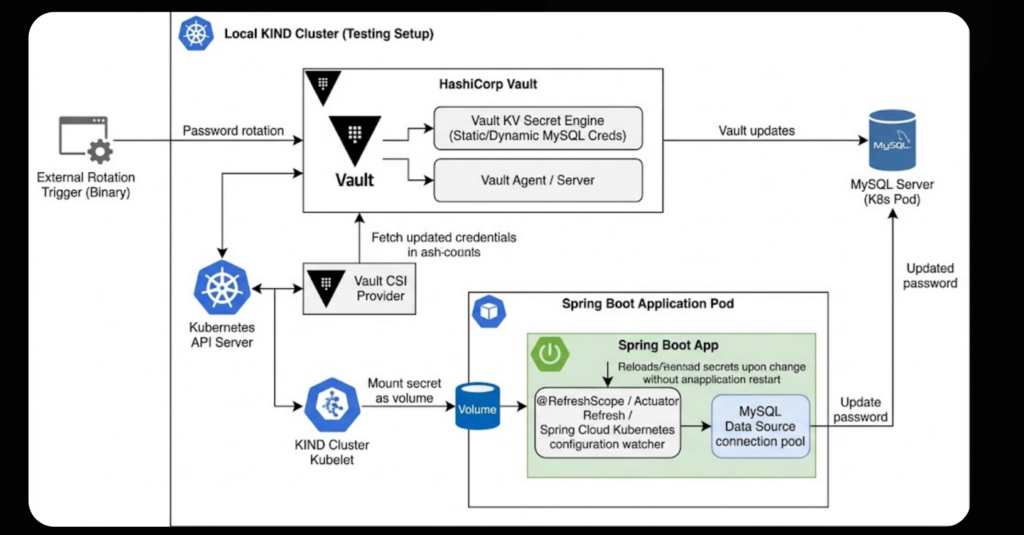
The configuration uses HashiCorp Vault as a secret provider in conjunction with the Secrets Store CSI driver. The goal is simple: a database password should be rotated and the application should take it over automatically – without restarting and without downtime, while k6 subjects the application to a load test.
The complete implementation and setup of the environment, including manifests and source code, can be found in a few minutes on GitHub:
How does it work?
Once you break it down, the process is quite simple:
- An external rotation trigger updates the password in Vault and clears the MySQL credentials using RETAIN
- The CSI driver retrieves the updated secret and updates the volume mounted in the pod
- The Spring Boot application recognizes the change and reloads the configuration
- The data source updates its connection pool using the new password
The crucial part is on the application side. Using Spring functions such as @RefreshScope (or a configuration watcher), the app can reread the updated credentials from the included file and refresh the database connections without being restarted.
This configuration runs entirely within a local KIND cluster, including all required components. A k6 load test continuously sends simple GET requests to a sample Spring Boot application. During the test, an external rotation trigger (implemented as a bash script) updates …
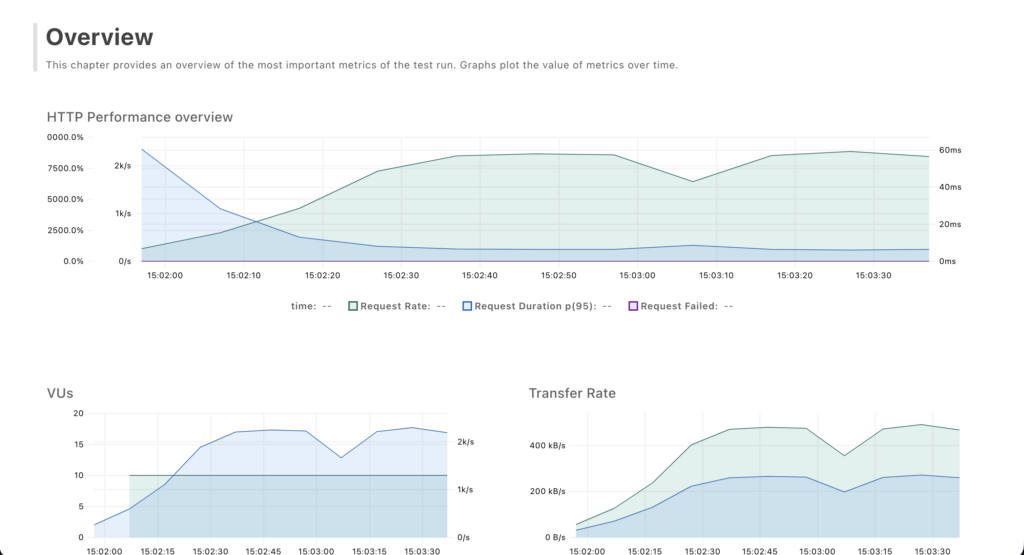
This configuration runs entirely within a local KIND cluster, including all required components. A k6 load test continuously sends simple GET requests to a Spring Boot sample application. During the test, an external rotation trigger (implemented as a bash script) updates the password.
The results show a slight increase in performance at the moment of password rotation, indicating that the application is processing the updated credentials. Overall, however, it can be seen that the password rotation runs seamlessly – without downtime, errors or HTTP responses that are not of type 200.
Why this example is important
This configuration effectively combines both critical aspects of secrets management. On the provisioning side, HashiCorp Vault in conjunction with the Secrets Store CSI driver ensures that updated credentials are dynamically propagated to the workload. On the consumer side, file-based access combined with Spring’s update capabilities allows the application to apply changes at runtime without requiring a restart.
The result is a robust, zero-downtime password rotation mechanism – something that is essential in production environments but is often implemented incorrectly or incompletely. This approach shows that with the right combination of tools and application design, seamless rotation is possible.
For those who want to experiment with the configuration, the repository provides all the necessary components to run it locally and observe the rotation behavior in practice.

